In modern software development, we have a dangerous habit: We trust our backend APIs too much.
We build beautiful Node.js, Python, or .NET applications. We put all our security logic—input validation, role checks, business rules—inside that application layer. We assume that if the API is secure, the data is safe.
But what happens when the API fails? What if an attacker bypasses the frontend? What if a junior developer accidentally pushes a bug that skips a validation check? Or worse, what if the threat is an insider with direct database access?
In these scenarios, your database is usually “naked.” It blindly accepts whatever INSERT or UPDATE command it receives.
I set out to challenge this standard.
The opportunity arose during my engineering studies at INPT (Institut National des Postes et Télécommunications) in Rabat. I was tasked with a standard relational database assignment, but I saw an opportunity to go further.
I built ORION-7—a simulated logistics system for a space station—as a high-assurance reference architecture. My goal was to move beyond simple data storage and prove that a database can, and should, defend itself.
Here is the exact technical blueprint for moving security “Left”—directly into your schema.
The Database That Fights Back: Building a T-SQL Firewall
The Problem
Most databases are passive. If you have the permission to write to a table, you can write anything to that table. This relies 100% on the application to check business rules (e.g., “Don’t sell restricted items to unverified users”).
The Solution
We need Compliance-as-Code. We wrap critical operations in Stored Procedures that act as a firewall. The database calculates the risk before committing the transaction.
How to Code It (Practical Example)
To demonstrate this, let’s look at a transport logistics model: managing a fleet of Shuttles assigned to specific destinations (Mars, Titan, Asteroid Belts).
The system recognizes three distinct types of actors, each with specific privileges:
- Astronauts: They pilot the ships but cannot authorize logistics.
- AI Agents: They calculate trajectories but have no legal authority.
- Engineers: The only humans authorized to sign off on safety-critical manifests.
For critical transactions, I enforced a strict “Two-Lock” policy to prevent catastrophic failure:
- Lock 1 (Identity): The approver must be a verified Engineer.
- Lock 2 (Safety): You cannot load hazardous material (e.g., radioactive fuel) onto a shuttle that lacks the specific
C-X2Radiation Certification.
Instead of relying solely on the backend API to enforce these complex rules, I moved the logic directly into the database using T-SQL. This ensures the rules are applied atomically, regardless of where the request originates.
Here is the actual pattern used in the SP_Validate_Critical_Request procedure:
CREATE PROCEDURE SP_Validate_Critical_Request
    @RequestID INT,
    @EngineerID INT,
    @MissionCode NVARCHAR(20)
AS
BEGIN
    -- 1. THE IDENTITY LOCK
    -- Verify the user is actually an Engineer (not just an admin account)
    IF NOT EXISTS (SELECT 1 FROM Actors WHERE ActorID = @EngineerID AND Role = 'Engineer')
    BEGIN
        RAISERROR('ACCESS DENIED: Only Engineers can validate.', 16, 1);
        RETURN;
    END

    -- 2. THE SAFETY LOCK
    -- Check if the asset is "Critical" (Level 4+)
    DECLARE @Criticality INT;
    SELECT @Criticality = CriticalityLevel FROM Materials WHERE MaterialID = @RequestID;

    IF @Criticality >= 4
    BEGIN
        -- Get the Shuttle assigned to this Mission
        DECLARE @ShuttleID NVARCHAR(20);
        SELECT @ShuttleID = RegistryNumber FROM Missions WHERE MissionCode = @MissionCode;

        -- Check if the shuttle has the specific 'C-X2' certification
        IF NOT EXISTS (
            SELECT 1 FROM Shuttle_Certifications sc
            JOIN Certifications c ON sc.CertID = c.CertID
            WHERE sc.RegistryNumber = @ShuttleID AND c.Label = 'C-X2'
        )
        BEGIN
            -- THE KILL SWITCH
            -- The DB throws a hard error (Severity 16).
            RAISERROR('CRITICAL SAFETY: Shuttle lacks C-X2 certification.', 16, 1);
            RETURN;
        END
    END

    -- 3. COMMIT
    UPDATE Supply_Requests SET Status = 'Validated' WHERE RequestID = @RequestID;
END
Why this matters: Even if an attacker bypasses your API’s business logic—or a junior developer accidentally deletes a check in the backend code—the database remains secure. It effectively says: “I don’t care what the application server says; this transaction is illegal.”
Stop Using “Super Admin” (RBAC Implementation)
The Problem
In development, we often connect using the sa (System Admin) account. In production, this creates a massive security hole. If that single account is compromised, the attacker has the “Keys to the Kingdom”—they can truncate tables, steal sensitive data, or wipe audit logs to hide their tracks.
The Solution
Implement strict Role-Based Access Control (RBAC). We create specific roles that have permission to do the work, but are explicitly denied permission to destroy the evidence.
How I Implemented It
Instead of relying on the default db_owner roles, you should create custom “Operational Roles.” These roles are designed to have high-power permissions for business logic, but zero permissions for destructive actions.
For example, let’s create a role for an Engineer. They need to validate critical requests, but they should never have the power to scrub the history of those actions.
-- 1. Create the Business Role
-- This replaces the generic 'db_datareader' or 'db_datawriter'
CREATE ROLE Role_Engineer;

-- 2. GRANT: The "Green Light"
-- Allow them to run the specific business logic procedure
GRANT EXECUTE ON OBJECT::SP_Validate_Critical_Request TO Role_Engineer;

-- 3. DENY: The "Immutable Audit Trail"
-- The 'AI_History' table tracks all kernel updates.
-- Even if an Engineer has 'DELETE' permissions from another group,
-- this explicit DENY ensures they can NEVER wipe the logs to hide a malicious update.
DENY DELETE ON AI_History TO Role_Engineer;
Pro Tip: In SQL Server, a
DENYcommand always overrides aGRANT. This means if a user is in the “Admins” group (which allows delete) but also in this “Role_Engineer” group (which denies delete), the database will BLOCK the delete. This guarantees that your audit trails are immutable by design.
Hardening Data Integrity: The “Conditional Unique” Constraint
The Problem
Security isn’t just about who can access data; it’s about ensuring the validity of that data. A common flaw in many schemas is the “All-or-Nothing” Constraint Trap.
Standard SQL constraints are blunt instruments. If you add a UNIQUE constraint to a column, it applies to every single row.
In my case study, I had two types of actors living in the same Actors table (Single Table Inheritance):
- AI Agents: Must have a unique Kernel ID (e.g.,
AI-9000). - Humans: Do not have Kernel IDs at all (Value is
NULL).
Here is the trap:
- If you enforce UNIQUE: The database will reject the second human you add, because it treats two
NULLs as duplicates (depending on ANSI settings). - If you remove UNIQUE: You allow data corruption. Now, nothing stops a bug from creating two AI Agents with the same ID.
Most developers choose option #2 and try to fix it with Python/Java code. This is a security failure. If that app code has a bug, your data integrity collapses.
The Solution
Use a Filtered Index. This allows you to enforce “Zero Trust” constraints surgically—applying strict rules to high-risk rows (AI Agents) while ignoring the others (Humans).
How I Implemented It
-- Enforce uniqueness ONLY when the data actually exists
CREATE UNIQUE NONCLUSTERED INDEX IX_Actors_IA_Kernel
ON Actors(IA_Kernel_ID)
WHERE IA_Kernel_ID IS NOT NULL;
This simple script allows me to have 1,000 humans with NULL IDs, but if I try to insert two AIs with the same Kernel ID, the database rejects it instantly. This closes the loophole at the schema level.
Proving Resilience: Physical Isolation & Cross-Platform Recovery
True security requires resilience. A database that relies on a single server—no matter how locked down—is a single point of failure.
If your database engine and your backups reside on the same physical disk, you don’t have security—you have a ticking time bomb. A single ransomware attack or hardware failure wipes out everything.
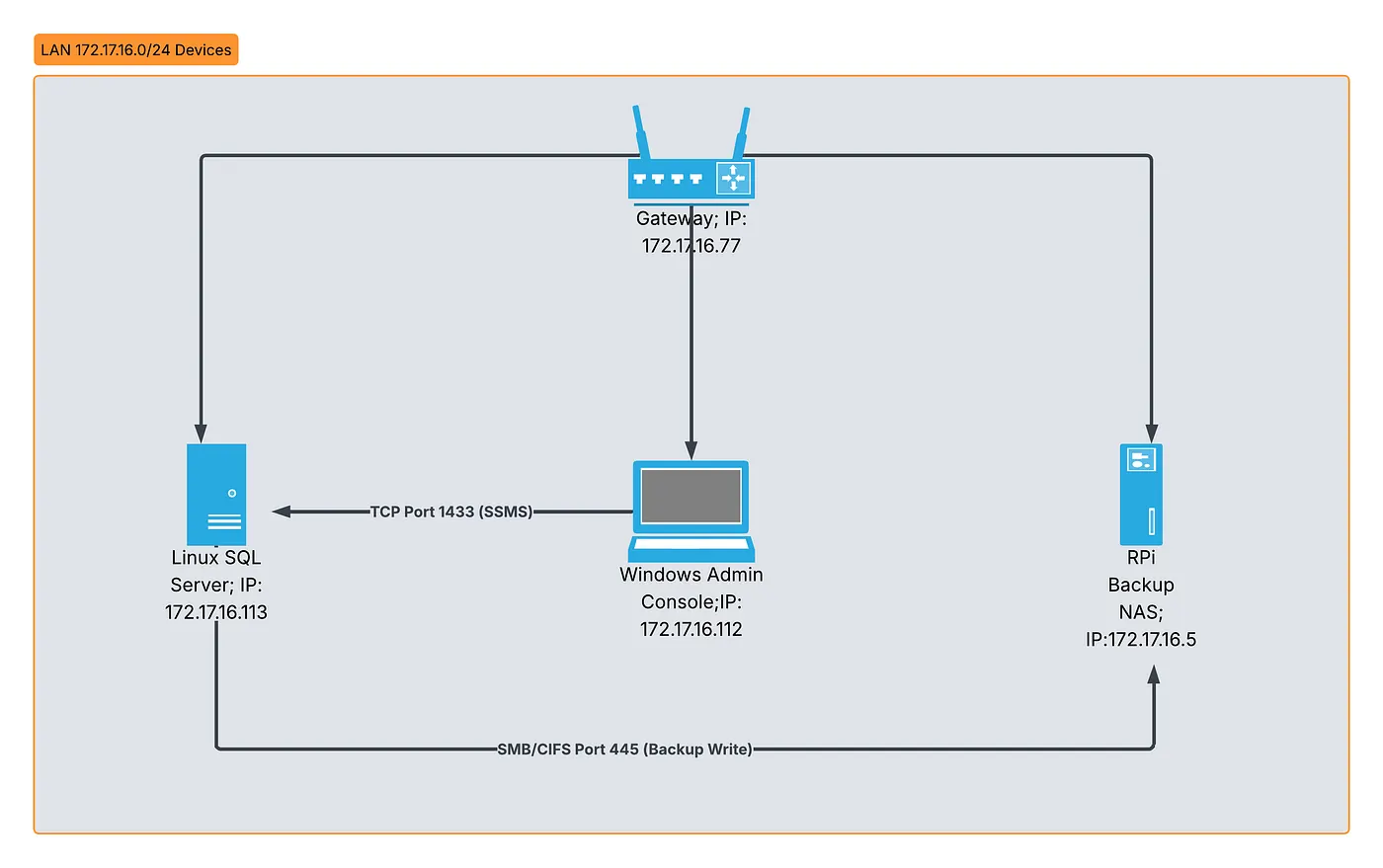
To validate this architecture for high-stakes environments, I moved beyond a standard deployment and built a Distributed Mixed-OS Network.
Why? Because Physical Isolation is the only guarantee against total system compromise.
I designed a network topology that separates the system into three distinct planes to minimize the impact of a potential breach:
- The Control Plane (Windows): Where the Admin manages permissions (SSMS).
- The Data Plane (Ubuntu Linux): Where the active Database Engine runs (SQL Server 2022).
- The Recovery Plane (Raspberry Pi): A physically separate Backup Server acting as a dedicated NAS.
Implementing Secure, Isolated Storage (NAS)
I configured the Raspberry Pi as a secure file server using Samba, ensuring that even if the main Linux database server crashes, the backups are physically isolated on a separate device.
Here is the actual smb.conf configuration I used to secure the backup tunnel:
# Raspberry Pi Samba Configuration
[Backups]
comment = SQL Server Linux Backups
path = /home/pi/sql_backups
browseable = yes
read only = no
writable = yes  ; Authorize write access for Linux Server
valid users = sql_user
create mask = 0770
To connect the Linux Database Server to this storage, I mounted the volume directly into the file system using CIFS:
# Mounting the Raspberry Pi NAS onto the Linux Server
sudo mount -t cifs //172.17.16.5/Backups /mnt/backups \
  -o username=sql_user,password='******',vers=3.0
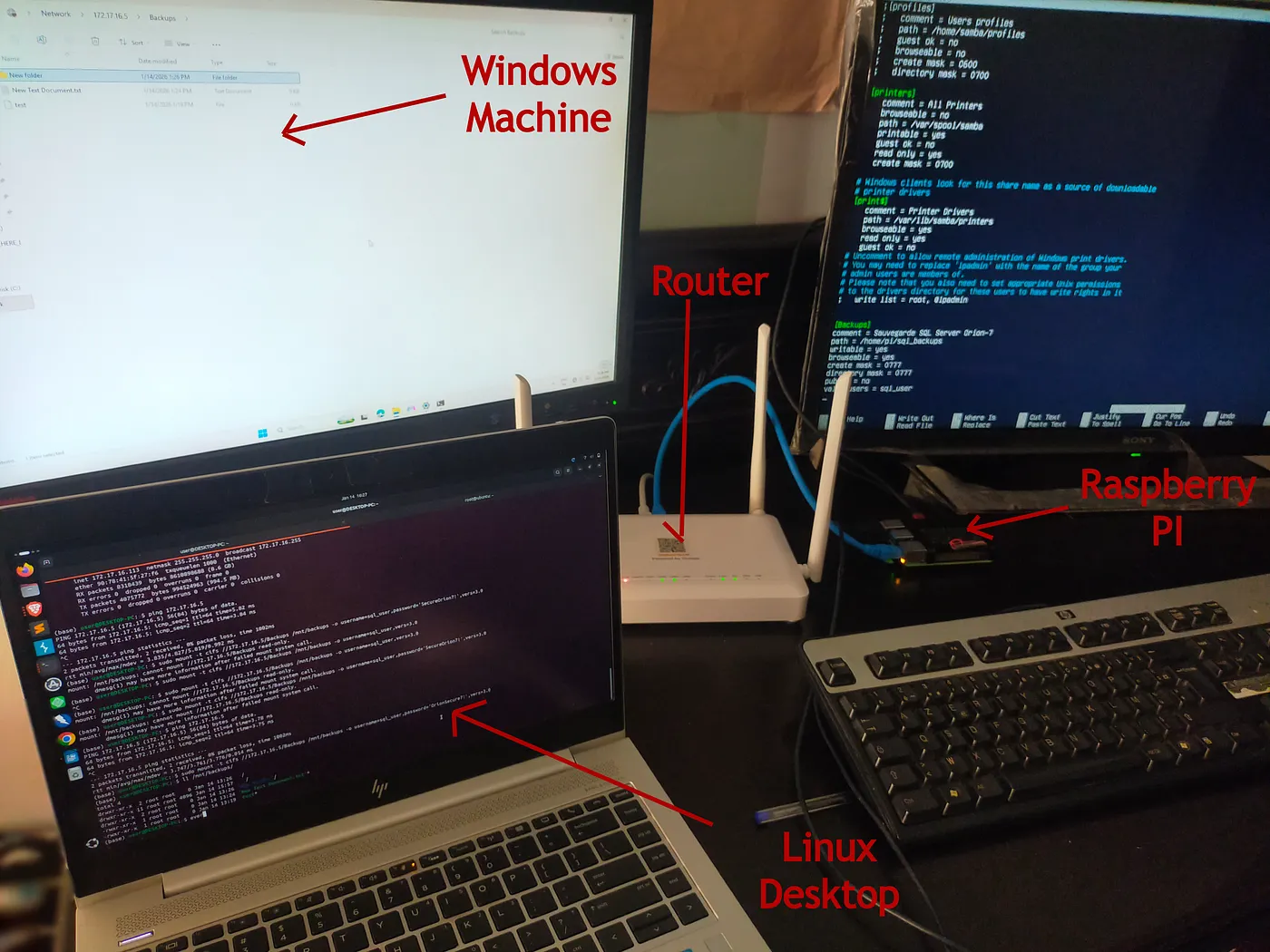
The Final Test: I triggered a backup request from my Windows workstation. The request traveled to the Linux Server, which then wrote the encrypted backup file to the Raspberry Pi.
Final Thoughts
We need to stop treating databases as “dumb buckets” that just hold our data.
Your database is the final frontier of your security architecture. By implementing RBAC, Stored Procedure Logic, and Strict Typing at the schema level, you create a system that is secure by design.
Whether this architecture is applied to a simulation or a production environment, the lesson remains the same:
Don’t trust the app. Trust the data.
Resources & Code
- GitHub Repository: https://github.com/Haitam-lazaar/secure-db-architecture-template
- Technical Whitepaper: Available as a PDF in the GitHub repository (under
/docs).
Special thanks to co-engineers Jean Arthur Awi Detine, Imane Ibnelhabib, and Nirmine Adnane for their work on the foundational data model.